Popular Vendors
Demo ServiceNow CIS-Discovery Exam Questions
Demo practice questions for guest users.
Question 1
Refer to the exhibit.
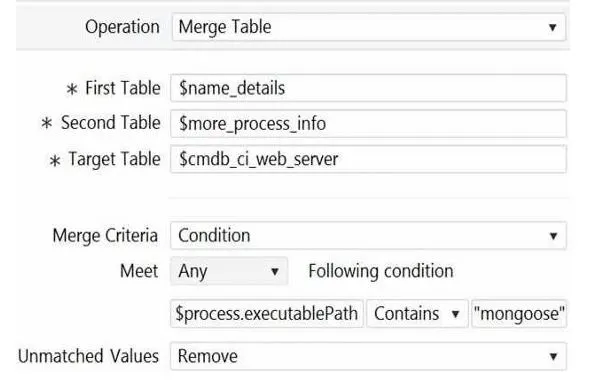
Based on this image, which of the following statements are true? (Choose three.)
Correct Answer: A, B, D
Explanation:
A is true because the target table $cmdb_ci_web_server is a ServiceNow CMDB table that stores
A is true because the target table $cmdb_ci_web_server is a ServiceNow CMDB table that stores
information about web servers1.
B is true because the merge table operation is typically used for application patterns, which are
horizontal patterns that discover applications and their dependencies. The condition on the
process.executablePath variable suggests that the operation is looking for a specific application
(mongoose) running on the web servers.
D is true because the merge table operation requires at least one matching field value between the
two source tables1. In this case, the process.executablePath variable is the matching field, and it
must contain “mongoose” for the operation to run.
Reference:
1: Merge tables - Product Documentation: San Diego - Now Support Portal
3: Product Documentation | ServiceNow
[4]: Discovery Patterns - Product Documentation: San Diego - Now Support Portal
Question 2
Refer to the exhibit.
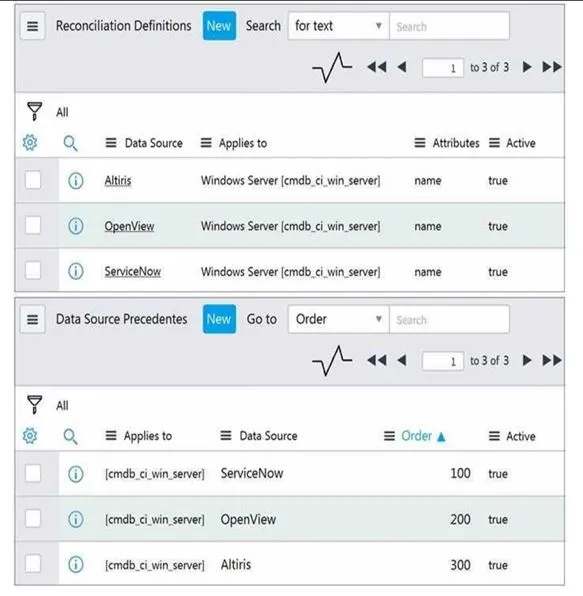
Based on the following images, which choice best describes what occurs if Discovery sets the name
attribute of a discovered Windows Server CI to 'Windows1' and then Altiris discovery runs detecting
'Windows2' for the name attribute on the same CI?
Correct Answer: B
Explanation:
In ServiceNow Discovery, the reconciliation process is governed by precedence rules. These rules determine which data source’s information will be retained if there are conflicts when multiple sources discover the same CI. In this case, Altiris has a higher order of precedence (300) compared to ServiceNow (100), as seen in the “Data Source Precedents” section of the image. Therefore, if Altiris discovers ‘Windows2’ for the name attribute on the same CI after ServiceNow sets it to ‘Windows1’, the name will change to ‘Windows2’ due to Altiris’s higher precedence. Reference: The explanation is inferred from understanding how reconciliation and data source precedents work in ServiceNow Discovery, though not directly quoted from specific documents. You can find more information on these topics in the following links: Reconciliation Data source precedents
Question 3
For the Parse Variable pattern operation, what is required to have two different parsing methods to populate variables?
Correct Answer: C
Explanation:
The Parse Variable pattern operation allows you to extract information from the output of a previous
The Parse Variable pattern operation allows you to extract information from the output of a previous
operation and save it in a variable. You can choose from different parsing methods, such as JSON File,
XML File, Regular Expression, or Custom Script. To have two different parsing methods to populate
variables, you need to use two different steps, each with a different Define Parsing selection. For
example, you can use one step to parse a JSON file and another step to parse an XML file. You cannot
use two different parsing methods on the same step, as the Define Parsing selection is unique for
each step.
Reference:
Parse command output: This article explains how to use the Parse command output operation and
the different parsing methods available.
Pattern Designer: Parse Variable - JSON File gives error: This article provides a troubleshooting tip for
using the JSON File parsing method.
Examples of EVAL scripts used in Discovery patterns: This article provides some examples of custom
scripts that can be used for the Custom Script parsing method.
Question 4
Which best describes Discovery schedule of type Configuration Item?
Correct Answer: C
Explanation:
A Discovery schedule of type Configuration Item collects complete information from the scanned IP
A Discovery schedule of type Configuration Item collects complete information from the scanned IP
ranges and sends it to the CMDB. This type of schedule runs a series of probes and sensors to identify
and classify the devices and applications on the network, and to create or update the corresponding
configuration items in the CMDB. A Discovery schedule of type Configuration Item can also run
patterns to discover more details and relationships about the configuration items.
Reference:
ServiceNow Discovery Overview
Create a Discovery schedule
Discovery schedule types
Question 5
When installing a MID Server on a Windows platform, which right must be associated when creating a Service Account?
Correct Answer: D
Explanation:
The Service Account for the MID Server must have the Log on as service right on the Windows
platform. This right allows the MID Server to run as a Windows service and communicate with the
ServiceNow instance. The Service Account does not need to have local or domain admin rights, as
these are not required for the MID Server functionality. The MID Server User Role is a role on the
ServiceNow instance, not on the Windows platform, and it is used to control the access and
permissions of the MID Server on the instance.